
Every morning I do yoga. And every morning, for the past four months, I’ve been running an interval timer app I made myself. Turns out you really can build an app without coding.
The thing is, I didn’t write a single line of code. I spoke into my computer, described what I wanted, and Claude Code built it.
That was when I first realised that you can build an app without coding, as long as you know exactly what you want it to do. It opened a door I didn’t know was there before.
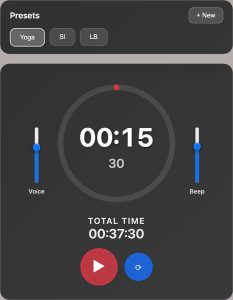
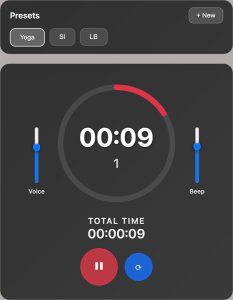
The ‘App’ I Was Using Before
Before I made my own, I was running an interval timer from the Google Play store on my phone while playing music on my laptop. Two devices, every morning. Fine, but annoying. One would be easier, right?
The phone app was functional, but the UI was rough. I have no idea how it made it through the review process. It looked like something from 2009 that nobody had touched since. But the bigger problem for me was a missing feature: short beeps at 25%, 50%, and 75% through each set interval.
For yoga, you don’t want to be checking your screen mid-pose. Audio cues tell you where you are in the set without breaking your focus. A quick beep at a 15 seconds, 30 seconds, and again at 45 seconds. Simple. The app I had couldn’t do that, so I was checking my screen constantly, which defeated the whole point.
Two problems. A clunky app and two devices. Neither one a disaster on its own, but together, after using them daily for months, they were enough.
The Friend Who Started It
At Christmas I went over to a friend’s house. He was sitting at his laptop talking to it. Literally talking: describing a bug he wanted fixed, out loud, while VS Code was open with Claude Code running. Things were getting debugged, rebuilt, and fixed as he spoke.
He looked up and said: “You should have a go at this.”
I thought it looked impressive, but at that point I had no reason to try it. I wasn’t a developer and had never needed to build anything from scratch. Also I had never coded before – this was a thing other people did. In the past I’d paid several developers to build things for me.
Some time later, I thought about the interval timer.
One Afternoon in VS Code
That same week, I sat down, opened VS Code with Claude Code, and started talking.
My spec was simple. An interval timer with saveable presets. A circular progress arc that fills as each interval runs. A voice countdown using the browser’s built-in speech: a voice that calls out “Set X” at the start of each round, counts down the last few seconds, says “rest” when switching phases, then “finish” when the workout ends. Short beeps at 25%, 50%, and 75% of each set time. Two separate volume sliders: one for the voice, one for the beep, so I could tune each independently.
Less than an hour later, I had a working HTML file. A few tweaks later, I could find nothing about it I wanted or needed to change.
You open it in a browser and it runs. When Claude first built the app, it added three default presets: Tabata, Classic HIIT, and Beginner. I deleted all of them. My version has one preset: my yoga routine, and that is all I ever touch. Adding, editing, and removing presets is simple, so anyone using it can set up whatever intervals they need and clear out everything else. The beeps land exactly where I wanted them, the voice is clear, and the layout looks clean. It does exactly what I built it to do and nothing else.
One App, One Task
Something I want to be specific about: I had no interest in building a feature-heavy interval timer. I didn’t need analytics, user subscriptions, social feeds, or to connect to the nearest smart fridge. I wanted one thing: a yoga timer with audio cues that looked decent and was easy to use.
Whatever you may want to use this interval timer for – it’s up to you, but I built it with this idea in mind :
One app. One task.
Every time I’ve used a tool that tries to do everything, I end up using none of the features. Complexity gets in the way. My timer is a single HTML file. It runs in any browser. Your presets save in local storage. That is the entire product, if you can even call it that.
And because it’s a file I own and control, I can change it whenever I want.
If you download it, you own and control your interval timer – and you can change it whenever you want too!
The Mobile Version
A few weeks after making the desktop version, I mentioned the timer to another friend who also does yoga. She wanted to use it, so I sent her the file. She opened it on her phone and it was unusable. The volume sliders, which on the desktop version sit on either side of the clock, were overlapping everything and crushing the layout.
So I went back into Claude Code and sorted it. The fix was simple: move the volume controls into their own panel above the clock, switch from vertical sliders to horizontal ones, and tighten up the layout for smaller screens. That became the mobile version.
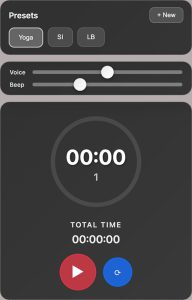
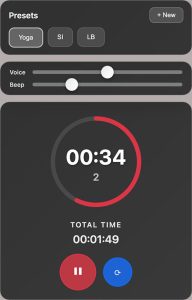
I still use the desktop version myself every morning. But if you want to run it on a phone, the mobile version works great on any device.
What Building an App Without Coding Opened Up
Here’s the honest part.
I didn’t code this. Claude Code did. What happened was: I spoke to my computer, described what I wanted, and Claude built it. If you asked me to open that HTML file and explain the JavaScript, I could maybe follow most of it. But I didn’t write it.
What I actually did was know what I wanted and described it clearly. That turned out to be the whole skill.
Since March I’ve made so many more apps and things to help me out. Little utilities, tools, scripts, apps that solve specific problems I had. Enough that at some point I had to build a task management system just to keep track of everything. I still forget to log new projects to it, which tells you how fast things have been going.
This interval timer was the first one, and it showed me what was actually possible.
Frequently Asked Questions
What is Claude Code?
Claude Code is a coding tool from Anthropic that runs inside your code editor, such as VS Code. You describe what you want to build in plain language and it writes the code for you. I use it with voice-to-text, so I can describe what I want by speaking out loud. The result gets built while I talk.
Do you need coding knowledge to build an app without coding?
You need to be able to describe clearly what you want. That’s it. The better your description, the better the output. Think in terms of behaviour: “when the interval ends, say rest and start the rest timer” is more useful than “make a good timer.” You don’t need to understand the code it produces.
Can I download the interval timer?
Yes. I’ve put it on my Gumroad page: grab it here. It runs in any modern browser on desktop or laptop. There’s also a mobile version if you want to use it on your phone or tablet.
What are the default presets?
The app ships with three: Tabata (20 seconds sets, 10 second rest, 8 sets), Classic HIIT (30 second sets, 15 seconds rest, 10 sets), and Beginner (30 second sets, 30 seconds rest, 6 sets). You can edit any of them, delete any of them, or create your own with custom set duration, rest duration, and number of sets. Your presets save in the browser automatically and will be there next time you open the HTML file.
You Can Build an App Without Coding
If you’ve been sitting on an idea for a small tool, something that would make your work or day a bit easier, and you’ve been putting it off because you don’t know how to code, this is worth trying.
If an absolute coding novice like myself can build an app without coding, anyone can.
The barrier to building an app without coding is not technical knowledge. It’s being able to describe what you want clearly enough that the output is actually useful. The more specific you are about the exact behaviour you need, the better the result will be.
Start small. One problem, one tool. Describe what it should do.
The interval timer I built works great – I use it every morning.
Ok people that’s it for this blog post. If you want a copy of the interval timer HTML file to try for yourself, just head on over to my Gumroad page and get it here.
If you noticed that no new posts had been written on my blog for hmm, about 3 and a half years – find out why here!
See you in the next one!
Dan